
Shape matters more than most people realize. Two dome arrays with identical materials, identical thickness, identical diameters — but different geometries — can feel completely different under the finger. One crisp and decisive. The other vague or wobbly. Same metal. Same size. Different shape.
Engineers new to dome array design sometimes treat shape as an afterthought, picking whatever the supplier lists first. That approach works occasionally, by luck more than anything. But when a product prototype comes back with mushy buttons or inconsistent click feel across the interface, the root cause often traces back to dome geometry that wasn’t matched to the application.
Shape selection deserves real engineering attention. It affects actuation force, tactile ratio, centering behavior, audible feedback, and long-term fatigue performance. Getting it right means understanding what each geometry offers — and where it falls short.
Common Dome Array Shapes and Their Characteristics
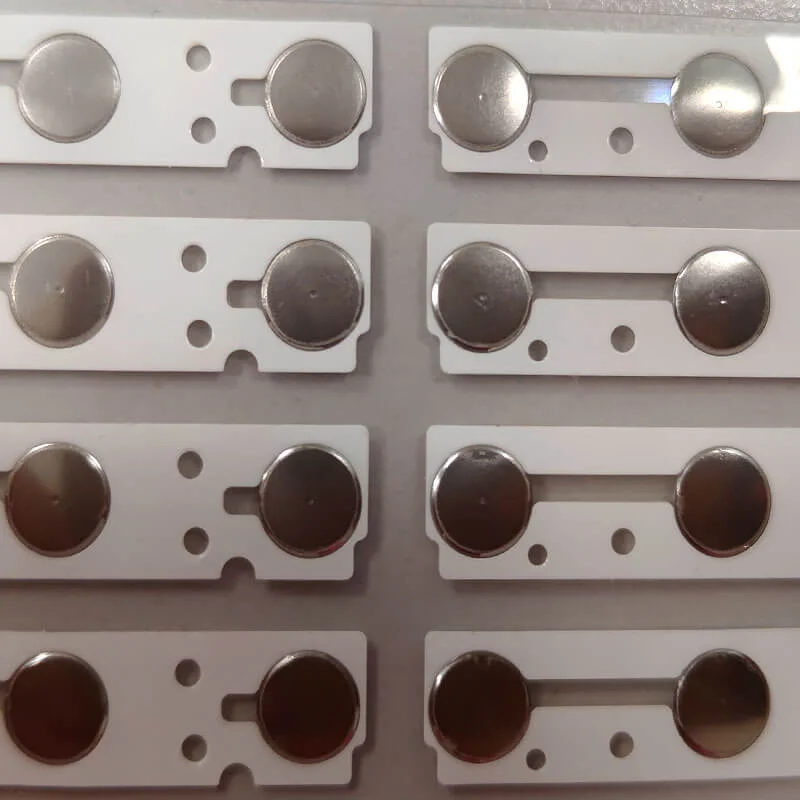
Round Dome Arrays
The default. Round domes are symmetrical in every direction, which makes them forgiving. They don’t care which direction pressure comes from — center loading, slightly off-center, even angled actuation all produce reasonably consistent snap behavior.
Round geometries suit most general-purpose applications:
- Consumer remote controls
- Appliance interface panels
- Standard keyboard layouts
- Medical device buttons
Available diameters typically range from 4mm up to 20mm. The relationship between diameter and actuation force isn’t perfectly linear, though. Larger round domes can feel softer despite using the same material thickness, because the curvature-to-span ratio changes. Something to watch for.
Four-Leg Dome Arrays
Four-leg domes — sometimes called spider domes — feature four curved legs extending from a central contact cap. The legs act as individual spring elements. This design fundamentally changes how the dome array behaves compared to simple round shapes.
Key advantages include:
- More stable actuation — reduced tendency to rock or tilt during off-center pressing
- Higher tactile ratio for a given size and force
- Crisper, more defined snap
- Better centering of the actuator over the contact pad
Four-leg designs are popular in automotive controls and premium consumer electronics where tactile quality directly influences perceived product value. They cost slightly more to manufacture — the forming tooling is more complex — but the improvement in feel often justifies the premium.
Oblong and Oval Domes Arrays
When space constraints prevent round geometries, oblong domes fill the gap. Literally. Rectangular or oval button zones on tight-pitch layouts sometimes can’t accommodate circular domes at the needed diameter.
Oblong shapes introduce directional behavior. The snap feels slightly different depending on whether force is applied along the long axis versus the short axis. Not dramatically different, but noticeable. In most dome array applications, the actuator sits centered enough that this asymmetry stays minor.
Shape vs. Performance in Dome Array Design
| Shape | Tactile Ratio | Center Stability | Off-Center Tolerance | Relative Cost | Typical Use Case |
| Round | Moderate | Moderate | High | Lowest | General purpose |
| Four-leg | High | Excellent | Moderate | Moderate | Premium interfaces |
| Oblong | Moderate-Low | Moderate | Varies by axis | Moderate | Space-constrained layouts |
| Triangle | Moderate | Good | Low-Moderate | Higher | Specialized custom designs |
Engineering Factors for Dome Array Shape Selection
Actuation Method Matters
How the dome gets pressed influences which shape works best. Direct finger contact through a thin overlay is forgiving — fingers self-center and apply distributed force. A hard plastic plunger, on the other hand, concentrates force at a point and may contact the dome off-center depending on mechanical tolerances.
For plunger-actuated designs:
- Four-leg domes resist tilting under off-center loads
- Round domes tolerate slight misalignment gracefully
- Oblong domes may rock if the plunger hits the long-axis edge
PCB Layout Constraints
The dome array must align precisely with contact pads on the circuit board. Dome shape dictates pad layout requirements. Round domes need simple center-and-ring pad patterns. Four-leg domes require specific leg landing zones. Oblong domes need elongated contact geometries.
Planning pad layout and dome shape simultaneously — rather than choosing one then forcing the other to fit — avoids headaches later in development.
Force and Feel Tuning
Shape provides one tuning variable. Others include:
- Material thickness (thicker equals stiffer)
- Dome height (taller equals more travel)
- Diameter (larger generally means higher force for same thickness)
- Leg width and curvature (for multi-leg designs)
These variables interact. Changing dome shape while holding everything else constant shifts the force curve. Changing thickness while holding shape constant shifts it differently. Experienced dome array suppliers can recommend starting points, but prototyping remains essential. Specifications on paper don’t fully capture what a button feels like to a human finger.
Application-Driven Dome Array Shape Decisions
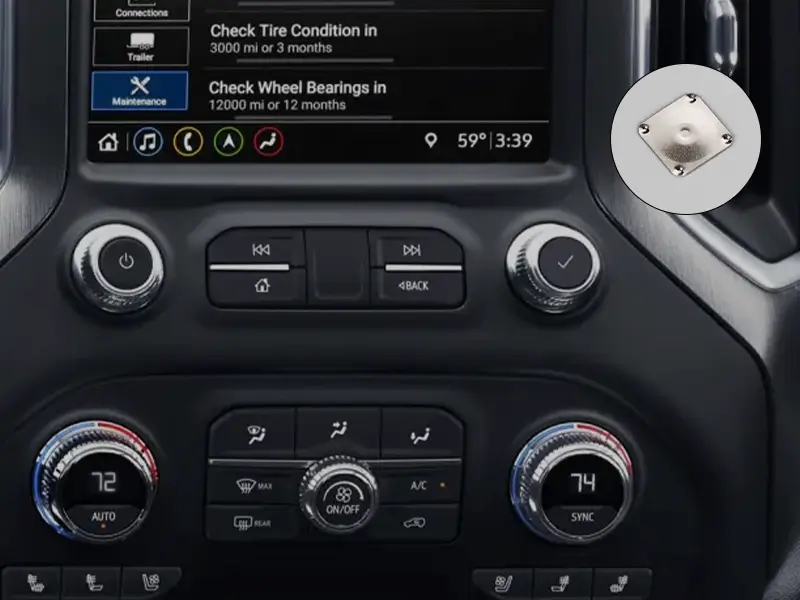
Automotive Interiors
Four-leg domes dominate here. Drivers operate controls without looking — gloved hands, vibrating vehicle, temperature extremes. The dome array must deliver unmistakable feedback every time. Four-leg geometry provides that assurance through superior tactile ratio and stable actuation. Automakers test switches exhaustively, and four-leg domes consistently pass the torture tests.
Consumer Electronics
Cost sensitivity pushes most consumer products toward round domes. They work well enough for casual use, and the savings add up across millions of units. Premium products — high-end audio equipment, professional tools — may justify four-leg upgrades for the enhanced tactile experience. If you want to know more about dome array, please read What Is a Dome Array.
FAQ
Can different dome shapes be mixed on one dome array?
Yes, this is done regularly in production. A single dome array carrier can hold different dome shapes and sizes across various button positions. A common example would be round domes for standard keys and a larger four-leg dome for a primary power or enter button. The constraint is that all domes sit on the same carrier sheet, so thickness and material are typically uniform. Different geometries and diameters, though — completely feasible and fairly standard practice among experienced suppliers.
Does dome shape affect lifespan?
Geometry influences fatigue behavior, so yes — though perhaps less dramatically than material or thickness choices. Four-leg domes distribute stress differently than round domes, potentially offering slightly better fatigue resistance because stress concentrates less at any single point. Round domes experience more uniform bending stress across the entire surface. In practice, both shapes comfortably achieve 1 million cycles or more when properly designed. Shape selection for longevity reasons alone is rare; tactile performance and layout constraints usually drive the decision first.
How do you prototype different dome array shapes quickly?
Most dome array suppliers maintain stock domes in common shapes and sizes. Requesting sample sheets with various geometries is straightforward and often free or low cost. For quick evaluation, individual loose domes can be placed manually on a test PCB — no custom carrier required. This allows side-by-side comparison of shapes before committing to a production dome array layout. The tactile difference between shapes becomes immediately obvious once you press them, which is far more informative than studying force-displacement curves on a datasheet.