Проведите некоторое время, наблюдая за современным производственным предприятием, и объем автоматизированного оборудования поразит воображение. Конвейеры, роботизированные руки, штамповочные прессы - кажется, что все они работают непрерывно и без перерыва. Но фактический мост между человеком-оператором и сложным мозгом машины обычно сводится к относительно скромной панели управления. Как основной компонент взаимодействия человека и машины, Мембранные переключатели в промышленном оборудовании стали своего рода стандартом для этих интерфейсов в промышленной автоматизации. Они прочны, визуально настраиваемы и в большинстве своем защищены от повседневной грязи заводской жизни.
Тем не менее, они не являются абсолютно неуязвимыми. Когда клавиатура управления выходит из строя в самый разгар важного производственного цикла, это создает огромную головную боль. Машины простаивают, дневные показатели не выполняются, а бригады технического обслуживания вынуждены искать замену. Обеспечение максимального срока службы этих компонентов имеет решающее значение для поддержания производственного процесса.

Понимание износа мембранных переключателей
Легко предположить, что если что-то разработано специально для промышленной автоматизации, то оно может выдержать практически все. Однако в реальности это редко бывает так. Мембранные переключатели обычно сталкиваются с тремя основными врагами на производстве: химической деградацией, механическим воздействием и экстремальными условиями окружающей среды. Постоянное воздействие синтетических смазочных масел или агрессивных чистящих растворителей со временем разъедает защитную графическую оболочку. Кроме того, существует и физическая сторона вопроса. Операторы в плотных кожаных перчатках могут нажимать на кнопки гораздо сильнее, чем это необходимо, что в конечном итоге приведет к сплющиванию внутренних металлических куполов. Это медленная поломка, но она определенно происходит.
5 практических советов по продлению срока службы мембранных переключателей
Совет 1: Пересмотрите порядок уборки
В большинстве автоматизированных предприятий инстинкт заключается в том, чтобы взять самый сильный промышленный обезжириватель, чтобы протереть грязные панели управления в конце смены. На самом деле это ужасная идея. Сильно агрессивные растворители могут со временем сильно ослабить верхний слой поликарбоната или полиэстера, что приведет к его растрескиванию, отслаиванию или полному запотеванию.
Напротив, использование более мягких методов очистки значительно улучшает ситуацию:
Для ежедневного удаления пыли и грязи используйте простую смесь мягкого посудного мыла и теплой воды.
Изопропиловый спирт (обычно около 70%) отлично подходит для дезинфекции, не расплавляя пластик.
Никогда не распыляйте жидкость непосредственно на саму панель; всегда сначала наносите ее на салфетку из микрофибры, а затем протирайте.
Давайте рассмотрим, как обычные заводские химикаты взаимодействуют со стандартными панельными накладками.
| Чистящее средство / химикат |
Безопасен ли он для накладок?
|
Долгосрочное влияние на группу
|
|---|---|---|
|
Мягкое мыло и вода
|
Да
|
Нет (поверхность остается чистой)
|
|
70% Изопропиловый спирт
|
Да
|
Безопасен для регулярной санитарной обработки
|
|
Ацетон / Очиститель тормозов
|
Нет
|
Быстро растворяет и замутняет пластик
|
|
Сильнодействующие отбеливатели
|
Использовать с осторожностью
|
Со временем может привести к обесцвечиванию графики
|
Совет 2: Обучите операторов правильному управлению
Это звучит немного глупо, но то, как нажимается кнопка, действительно имеет значение в долгосрочной перспективе. При высокоскоростной автоматизации операторы иногда торопятся (или расстраиваются) и начинают тыкать в кнопки. мембранные переключатели кончиком отвертки, ручки или углом гаечного ключа. Такая точечная нагрузка мгновенно повреждает скрытые внутри тактильные купола. Переключатели сконструированы таким образом, чтобы их можно было активировать кончиком пальца. Поощрение операторов использовать плоскую подушечку пальца, а не тыкать острым инструментом, продлевает срок службы интерфейса.
Совет 3: Защититесь от экстремальных факторов окружающей среды
Хотя мембранные переключатели хорошо защищены от пыли, экстремальное воздействие ультрафиолета или сильные перепады температуры со временем разрушают клей, скрепляющий слои. Если автоматическая машина расположена прямо под ярким световым люком или рядом с открытой дверью погрузочной платформы, где солнце печет ее весь день, цвета потускнеют, а пластик станет хрупким. Добавление простого солнцезащитного козырька над панелью или небольшое изменение положения блока управления может легко предотвратить такую усталость от окружающей среды.
Совет 4: Не забывайте о процессе начальной установки
Многие преждевременные поломки связаны с тем, как именно была установлена панель. Если металлическая опорная пластина подготовлена неправильно, клей не схватится, оставляя микроскопические зазоры, через которые влага может проникнуть внутрь и разрушить электронику.
При нанесении новой панели специалисты по техническому обслуживанию должны соблюдать строгую последовательность действий, чтобы обеспечить долговечность:
Полностью удалите остатки старого клея с помощью безопасного для электроники растворителя.
Убедитесь, что металлическая монтажная поверхность абсолютно сухая и на ней нет пыли.
Снимите подложку с новой панели и медленно приложите ее с одного края, чтобы естественным образом вытеснить все застрявшие пузырьки воздуха.
Равномерно и сильно надавите на всю поверхность (иногда используя мягкий резиновый валик), чтобы полностью активировать клей.
H3: Совет 5: Тщательно прокладывайте соединительный хвост
Совет 5: Тщательно прокладывайте соединительный хвост
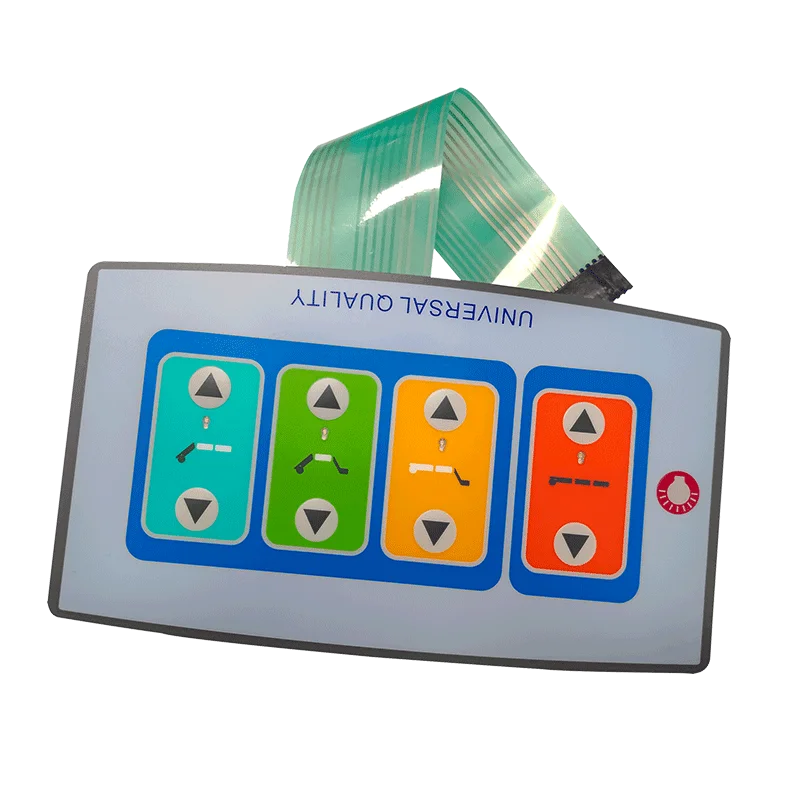
Гибкий шлейф, соединяющий клавиатуру с логической платой, удивительно хрупок по сравнению с остальными элементами сборки. При подключении мембранных переключателей в темном электрошкафу очень важно не смять и не перегнуть этот плоский ленточный кабель. Резкий изгиб может буквально переломить напечатанные серебряные схемы внутри пластика. Просто позвольте ему естественно изогнуться в направлении разъема, чтобы предотвратить множество загадочных электрических неисправностей в дальнейшем.
ЧАСТО ЗАДАВАЕМЫЕ ВОПРОСЫ
Можно ли отремонтировать поврежденную накладку на мембранном переключателе?
Не совсем так. Если верхний слой пробит или глубоко расколот в результате удара, герметичность будет окончательно нарушена. Влага, масло и пыль быстро проникнут внутрь и замкнут основную цепь. Почти всегда лучше просто заменить всю клавиатуру в сборе, пока она не стала причиной внезапной неисправности оборудования.
Влияет ли тип материала столешницы на срок службы мембранных переключателей?
Безусловно. Полиэстер, как правило, гораздо долговечнее поликарбоната, особенно в условиях воздействия агрессивных химических веществ или постоянного изгиба. Если кажется, что панель управления изнашивается слишком быстро, обновление материала накладки при следующей модернизации машины будет очень разумным шагом.
Являются ли тактильные или нетактильные мембранные переключатели более долговечными?
Нетактильные переключатели (внутри которых отсутствует металлический защелкивающийся купол) фактически имеют несколько больший механический срок службы, поскольку в них просто меньше движущихся частей, которые могут износиться. Однако в шумных системах автоматизации операторам обычно требуется отчетливая физическая обратная связь от тактильного купола для подтверждения их ввода, что делает тактильные варианты более практичным выбором, несмотря на технически более короткий срок службы.